
NXLog Agent data processing overview
NXLog Agent uses a modular, file-based configuration system, so you can tailor your configuration according to your requirements. It is worth taking a few minutes to understand how NXLog Agent processes data. Once you have a good grasp of the concept, you can easily create configurations to collect and process telemetry data from diverse sources.
Architecture
NXLog Agent processes data via input, processor, and output modules. In addition, extension modules support processing specific data formats.
With this modular architecture, you can choose which modules to load and separate the input from the output, so you can route a single input to multiple outputs and multiple inputs to a single output.
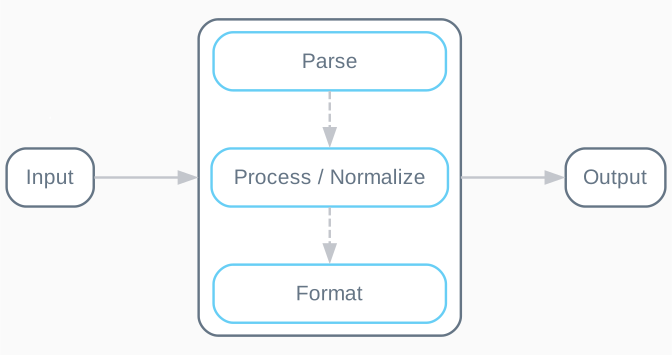
- Input
-
Collect telemetry from your data sources. Inputs can include local or remote file-based logs, Windows events, syslog messages received over TCP or UDP, host metrics, or any other source supported by NXLog Agent input modules.
NXLog Agent treats each event or metric as a record consisting of fields. In most cases, it saves the collected input in the
$raw_eventfield and creates the following core fields:-
$EventReceivedTime -
$Hostname -
$SourceModuleName -
$SourceModuleTypeDepending on the input module, other fields may be created automatically.
-
- Parse
-
Parse events or metrics into structured data to allow further processing of the record. Various extension modules support parsing standard data formats or include functions to extend processing capabilities through external scripts. Additionally, the NXLog language supports regular expressions to parse custom data formats. Some input modules automatically parse the raw data into fields, removing the need for further parsing.
- Process / Normalize
-
Once the raw data is parsed and additional fields are created, you can decide what to do with the record. For example, you can drop records based on the event type or severity, truncate data, or enrich the record with additional data. You can also normalize data according to your SIEM requirements at this stage. See Normalize events.
- Format
-
Convert the record to the required output format. Most output modules use the value of
$raw_event, so you must ensure that the data in this field is in the required format. Extension modules support converting records to standard formats, such as JSON, CSV, and XML. - Output
-
Forward the data to the destination, such as a SIEM, database, metrics endpoint, or any destination supported by NXLog Agent output modules.
See the documentation of individual modules for details on configuration settings, fields created by default parsing, and functions and procedures the module makes available.