
Log discovery
NXLog Platform includes a log analytics interface that lets you search the data collected from your NXLog Agent fleet. You can save and share your searches for future use, simplifying recurring log analysis tasks. Navigate to Logs > Log search > Log discovery to access the page.
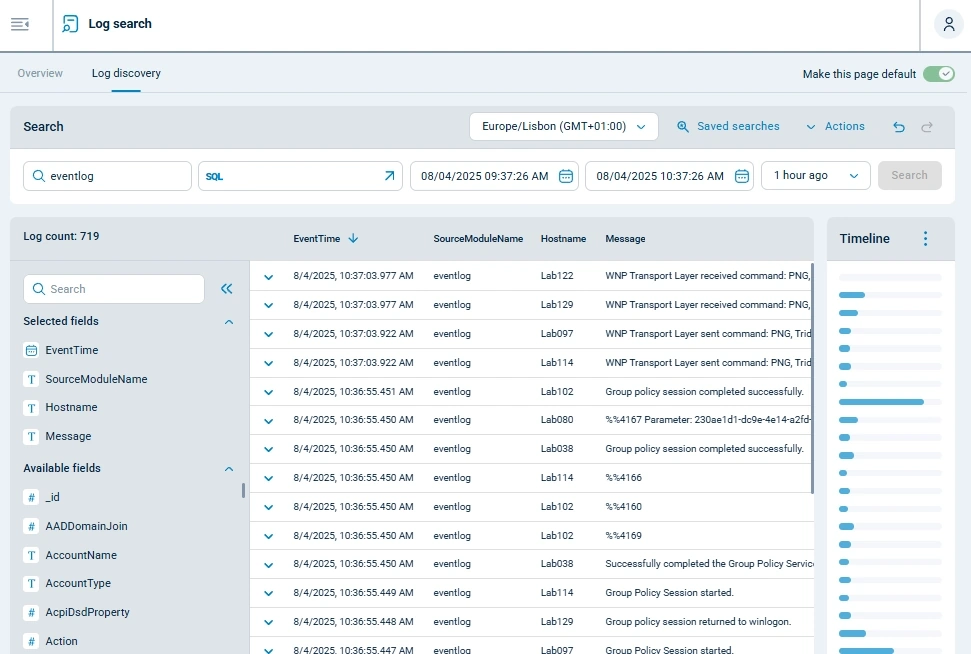
The following sections describe the main features of the Log discovery page.
Search toolbar

-
Time zone selector. Set to your local time zone by default.
-
Use Saved searches to load or manage your saved searches.
-
Use the Actions menu for search-related functions, including saving, sharing, and clearing the search conditions.
-
Use the Export menu to export search results as CSV or JSON.
-
Use the back and forward buttons to navigate through searches from your current session.
Search conditions

| NXLog Platform runs tokenized search with case-insensitive pattern matching. |
-
Free-text search that searches in the following columns:
Message,Hostname,SourceModuleNameandSourceModuleType. -
Filter data by an SQL expression. The arrow button opens the Query builder.
-
The time range limit for the search.
-
A list of preset relative time frames to set as the date range, such as the last hour or last day.
-
The Search button executes the search according to your search conditions.
See Perform a log search for more information.
Data table
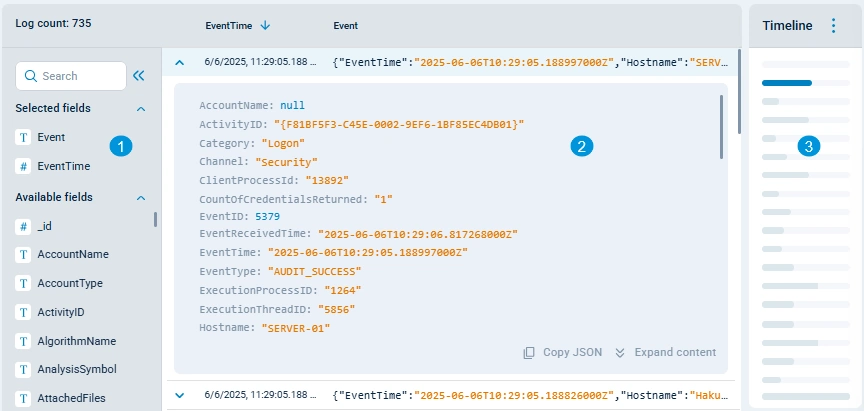
-
A list of fields to customize the columns shown in the data table.
-
The table displays the search results. You can expand each row to view the complete details.
-
The timeline shows a record count per 5-minute interval, so you can focus the data table on a specific interval.
See Analyzing the search results for more information on exploring the data table.