
Purge data
You can purge data you do not need anymore. NXLog Platform supports purging data on two levels: globally and by log type.
| Follow the instructions below with caution. You cannot recover deleted data. |
Purge data globally
You can purge all data in the database by modifying the global data retention settings as follows:
-
Navigate to Settings > Storage > Log types management.
-
Click Change retention period in the Global data retention period widget.
-
Under Retention time (days), enter 1 for the days to retain your data.
-
Click Save.
This method does not delete your data immediately. Data deletion runs once a day at midnight UTC (00:00).
Purge data by log type
You can purge data by log type for a specific date range as follows:
-
Navigate to Settings > Storage > Log types management.
-
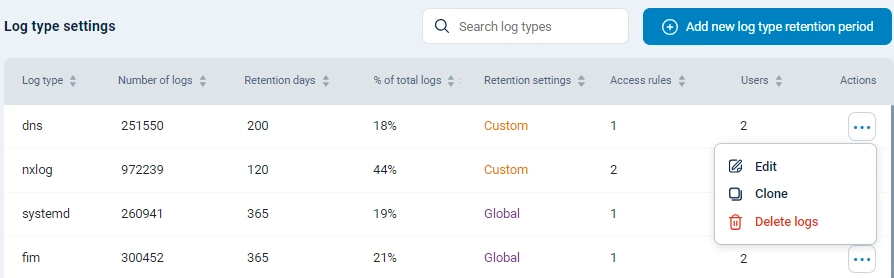
In the Log type settings table, click the Actions menu for the log type you want to delete and choose Delete logs.
-
Select the Date from and Date to in the Delete log data panel.
-
Click Delete.
-
Verify the log deletion details and click Apply.
This procedure takes effect immediately.
Purging data by log type will only delete the logs, not the log type. See Delete a log type if you also want to remove the log type from NXLog Platform.