
NXLog Agent data collection modes
NXLog Agent can collect telemetry data in three modes. Each mode has different characteristics, and you can use any combination of modes within your telemetry data pipeline.
- Agent-based data collection
-
NXLog Agent runs on the system that generates the telemetry data.
- Agentless data collection
-
Applications or devices send telemetry data to NXLog Agent over the network.
- Offline data processing
-
Use the nxlog-processor(8) tool to process telemetry data manually or via a script.
Agent-based data collection
In agent-based data collection, you install NXLog Agent on the source and configure it to collect, process, and forward telemetry data.
Agent-based data collection is especially suitable if you need to transform the data before forwarding it to the destination and for secure and reliable data transfer. We recommend this mode for most use cases.
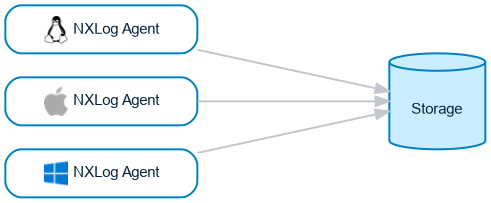
Agent-based data collection offers significant advantages over agentless collection, some of which are:
-
You have more data collection options. Telemetry data sources often provide multiple output methods and formats you can choose from according to your requirements. For example, you can collect logs from a file rather than being tied to using an unreliable logging process to send logs over the network.
-
Implement reliable and secure data collection. NXLog Agent includes delivery guarantees and flow control systems to ensure telemetry data reaches the destination. You can also monitor the health of NXLog Agent instances from NXLog Platform to maintain operational integrity.
-
You can filter, normalize, and enrich telemetry data before forwarding it to the destination. NXLog Agent has a comprehensive list of data processing capabilities, including transforming events and metrics to a different format, such as JSON, XML, or CSV.
-
You have complete control over how you transfer telemetry data. NXLog Agent supports several network protocols, including TLS/SSL over TCP and HTTPS for secure data transfer. You can also compress data and implement buffering if necessary.
-
You can chain NXLog Agent instances in a collector-forwarder topology, where agents running on the sources forward data to a relay agent that forwards it to the destination. See Using NXLog Agent as a relay.
-
NXLog Agent supports built-in failover: configure multiple destination hosts in the output module, and NXLog Agent automatically switches to the next host if one becomes unavailable. See NXLog Agent high availability.
Although agent-based data collection has its benefits, there are instances where installing an agent on the source is not possible, including:
-
Many network devices and embedded systems, such as routers and firewalls, do not support installing third-party software.
-
Compliance or regulatory mandates may prohibit you from installing third-party software on certain systems.
Agentless data collection
In agentless data collection, you configure a central NXLog Agent instance to receive and process telemetry data from remote sources. You then configure applications or devices to send telemetry data to this NXLog Agent instance over the network using protocols such as TCP, UDP, HTTP, WEF, and MSRPC.
We only recommend agentless data collection for sources where you cannot install third-party software, such as network devices and legacy or embedded systems.
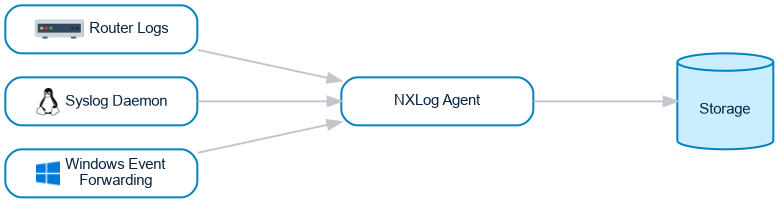
Agentless data collection can be advantageous because you do not need to install additional software on the source, and applications and devices that support forwarding telemetry data over the network generally only require minimal configuration.
However, it also has some disadvantages that are worth considering, including:
-
Data may not be transferred reliably and securely. For example, most syslog forwarders use UDP to transfer logs over the network, which is neither reliable nor secure. In addition, it is unlikely that you can monitor the health of the forwarding process, resulting in potential data loss if the process or communication breaks down.
-
Agentless data collection concentrates all processing on a single NXLog Agent instance, which can become a bottleneck as the number of sources increases. For example, collecting from many Windows hosts using Windows Event Forwarding (WEF) places far more load on the central agent than distributing collection across the individual NXLog Agent instances.
-
Agentless data collection can place a heavier resource load on the source than running NXLog Agent. For example, on Windows, using the Windows Management Instrumentation (WMI) protocol to forward events can consume more system resources compared to NXLog Agent.
| For information on how agentless data collection affects data source counting and your license quota, see Data source count accuracy and limitations. |
Offline data processing
While the other two modes process data in real-time, you can process telemetry data offline with the nxlog-processor(8) tool. The tool is similar to the main NXLog Agent service and uses the same configuration system but runs in the foreground and exits once it processes all the data.
There are several reasons why you may need to process telemetry offline, such as:
-
Transferring events from log files to a database.
-
Converting telemetry data to a different format.
-
Testing patterns.
-
Correlating events.
-
Checking HMAC message integrity.