
System settings
You can configure general NXLog Platform settings from the System page, including Single Sign-on (SSO), mail server, and security settings. Navigate to Settings > System to access this page.
Mail server settings
NXLog Platform sends automatic emails triggered by specific actions, such as user invites, password reset requests, and system alerts. NXLog Platform uses the mail server and account you configure here to send the emails. Without these settings, NXLog Platform can’t send automatic emails.

| Setting | Description |
|---|---|
Host |
The SMTP server’s URL. |
Port |
The SMTP server’s port. |
Sender email |
The email address to use. Users see NXLog Platform emails coming from this address. |
Test email recipient |
The email address where NXLog Platform sends test emails when you click Send test email. |
Encryption |
The encryption type to use when communicating with the SMTP server.
The options are |
Authentication |
The authentication method to use when communicating with the SMTP server.
The options are Refer to Authenticating to Microsoft 365 with OAuth for more information on using a mailbox hosted on Microsoft 365. |
Username |
The user account name to authenticate with the SMTP server.
Required when using |
Password |
The user account password to authenticate with the SMTP server.
Required when using |
Tenant ID |
The Microsoft Entra ID Directory (tenant) ID.
Required when authenticating to |
Client ID |
The Microsoft Entra ID Application (client) ID.
Required when authenticating to |
Secret |
The client secret to authenticate with Microsoft 365.
Required when authenticating to |
Send test email |
Sends an email to the address specified in the Test email recipient field. |
Third-party authentication settings
NXLog Platform supports Single Sign-on (SSO) to simplify user sign-up and sign in. The following third-party identity providers are available:
Security
Configure settings related to idle sessions and password reset links.
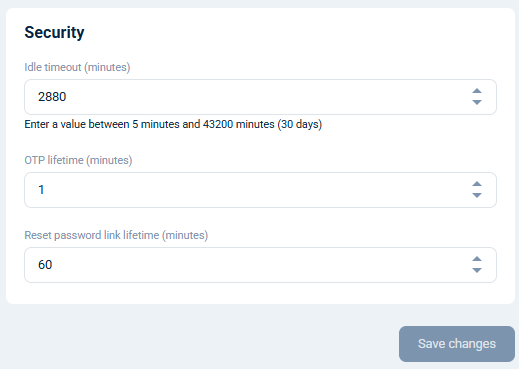
| Setting | Description |
|---|---|
Idle timeout (minutes) |
The time limit for a user session to remain inactive. Once this limit elapses, NXLog Platform automatically signs the user out. The minimum value is 5 minutes. The default is 60 minutes (1 hour). |
Reset password link lifetime (minutes) |
The period the password reset link is valid for in minutes. The default is 1 hour. |
Enforce two-factor authentication
You can enforce two-factor authentication for all users in the organization. You must be an administrator and activate two-factor authentication on your account to configure this setting.
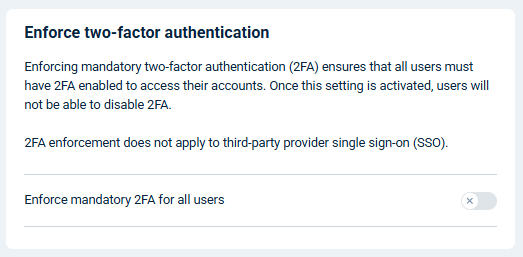
| Setting | Description |
|---|---|
Enforce mandatory 2FA for all users |
Use this switch to activate or deactivate two-factor authentication for all users:
If a user is a member of multiple organizations and one enforces two-factor authentication, they are required to use two-factor authentication to sign in to the NXLog Platform Customer Portal. Two-factor authentication does not apply to users signing in with third-party authentication providers. You can view which members have two-factor authentication configured by navigating to Settings > Users and switching to the Users tab. |