
NXLog Agent records and fields
NXLog Agent treats each event and metric it collects as a record.
A record comprises the $raw_event and NXLog Agent core fields in its most basic form.
NXLog Agent’s advanced data parsing capabilities do this automatically through input modules, or you can customize parsing with NXLog language functions.
Once NXLog Agent collects and parses a record into structured data, you can use the fields to filter, normalize, or enrich records.
What is a record?
In NXLog Agent, a record is a single event or metric and the data related to it. Telemetry data comes in many shapes and forms. However, some of the most common formats include:
-
Text-based events delimited by a newline. This is NXLog Agent’s default input and output type.
-
Multiline events. You can parse these events with NXLog Agent’s multiline parser.
-
Text-based events can be in various data formats such as JSON, XML, CSV, or key-value pairs. NXLog Agent has extension modules to parse and output these data formats.
-
Events as UDP datagrams. NXLog Agent’s UDP input and output modules can parse and send UDP datagrams.
-
Logs can be stored in a database table, where each row signifies a single event. The ODBC input and output modules can read and write events to ODBC-compliant database engines.
-
Host and application metrics. Common metric formats include OpenTelemetry and Prometheus.
-
The proprietary NXLog Binary format preserves event fields during transit. Use this format when sending data to NXLog Platform or another NXLog Agent instance. If you need to use another format, carefully consider its characteristics to make sure it preserves the data you need. For example, JSON has no datetime type, but many software applications and services support it.
Incoming records
NXLog Agent creates an internal representation of each event and metric it collects using fields. Each field is typed and represents an event or metric attribute. These fields pass through the data route and are available in each subsequent module in the chain until the output instance forwards the record to its destination.
The way NXLog Agent parses a record on collection depends on its type.
Unstructured data
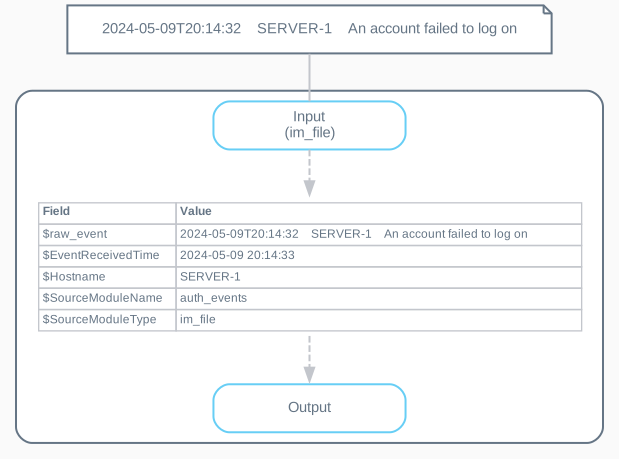
NXLog Agent sets the value of the $raw_event field to the entire text and adds the core fields.
Unstructured telemetry data may be text-based events that arrive via TCP, UDP, or collected from a file.
The following diagram illustrates the structure of a record collected by the im_file input.
Structured data
NXLog Agent automatically parses structured telemetry data into module-specific fields, such as Windows events, macOS ULS logs, or events collected from a database. You can find the list of fields in each module’s documentation.
The following diagram illustrates the structure of a record collected by the im_msvistalog input module.
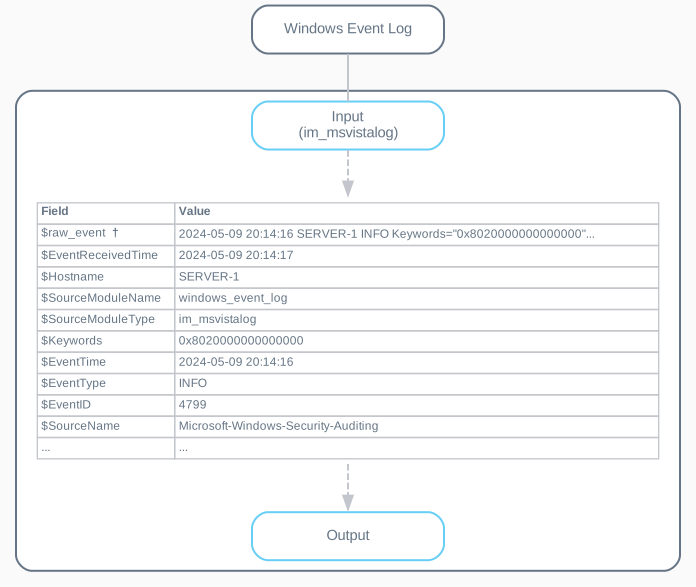
† Not all input modules that collect structured data set the $raw_event field.
Outgoing records
The way NXLog Agent forwards records depends on the output module.
-
Stream-oriented modules, such as the TCP, HTTP(s), and File output modules, forward the value of the
$raw_eventfield. Therefore, you must ensure that this field contains all the relevant information. You can use a data conversion procedure, such as to_json() or to_syslog_bsd(), to populate the$raw_eventfield. -
Specialized modules, like the ODBC output module rely on fields and do not use the
$raw_eventfield. If you’re collecting unstructured data, you must parse records into structured data with a regular expression or a data parsing procedure such as parse_json() or parse_syslog().
Manipulating records
You can manipulate records by adding, deleting, or renaming fields. The NXLog language includes several functions to help you tailor telemetry data according to your needs. For examples, see our how-to on Normalizing events.