
Data source counting
NXLog Platform licensing is based on data sources, which are hosts whose telemetry data is collected by an NXLog Agent instance. At any given time, each active data source counts against your license quota.
How NXLog Platform counts a data source depends on the data collection method:
- Agent-based collection
-
Each enrolled NXLog Agent instance counts as one data source, regardless of the number of local sources it collects from (such as log files, Windows Event Log, or databases) or the volume of data it processes.
- Agentless collection
-
NXLog Platform identifies each data source by the unique combination of source IP address and source port number used to connect to an NXLog Agent relay.
Both values are required to uniquely identify data sources since multiple devices behind a NAT device, proxy, or load balancer share the same IP address and can only be distinguished by source port. The same identification logic applies to both connection-based protocols (such as TCP, HTTP, and SSL) and connectionless protocols (such as UDP).
Data source count accuracy and limitations
The following details of NXLog Platform data source counting are important for accurately interpreting your license usage and for ensuring accurate counts in your deployment:
-
The data source count reflects the current state of your deployment and refreshes as NXLog Agent instances report their counts once per minute.
-
NXLog Platform counts data sources independently per NXLog Agent instance and does not consolidate counts across instances. NXLog Platform counts a source that sends data to two NXLog Agent instances simultaneously as two data sources, one for each instance.
-
In agentless deployments, certain network conditions can cause the same data source to be counted multiple times. The sections below describe the required configuration to ensure accurate data source counting in these situations.
Sending data over UDP
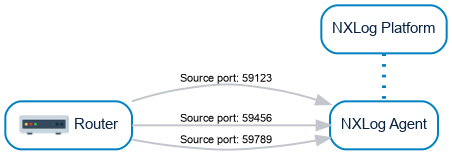
With connection-based protocols, the source port is stable for the duration of the connection, and its data source entry is removed when the connection closes. However, with connectionless protocols such as UDP, there is no persistent connection, and the source port can be different between sessions. NXLog Platform counts a device that uses a different source port for each session as a new data source every time. Unlike connection-based protocols, there is no connection close event to remove stale entries, so a device that changes its source port between sessions continuously adds new data sources.
For example, a router sending data over UDP using three different outbound ports results in 3 data sources:
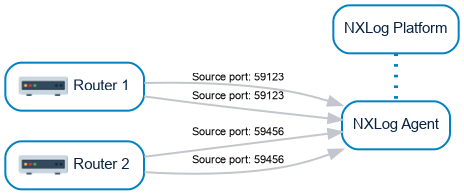
You must configure devices sending data over UDP to use the same source port to avoid duplication.
For example, two routers sending data over UDP, with each device using the same outbound port, results in 2 data sources:
Sending data through a proxy or network load balancer
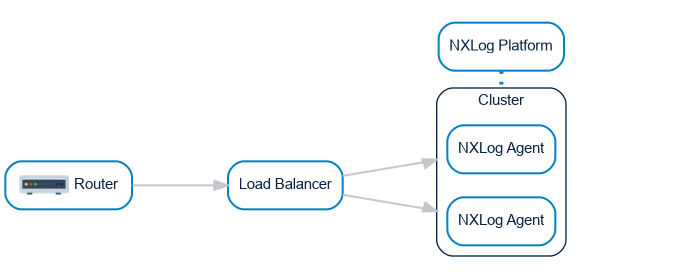
If devices send data to an NXLog Agent cluster via a reverse proxy or load balancer, NXLog Platform can count the same device for each NXLog Agent instance through which the data passes.
For example, a router sending data to an NXLog Agent cluster via a load balancer that distributes connections between two agent instances results in 2 data sources:
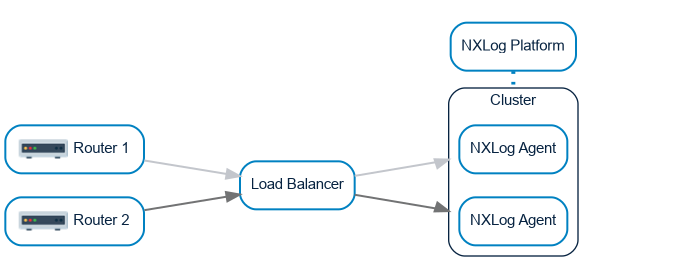
To avoid this, you must configure persistent connections on your load balancer, such as hash-based routing by source address.
For example, two routers sending data via a load balancer, which always routes connections from the same source to the same agent instance, results in 2 data sources:
See also
-
Entitlements usage — View your entitlements usage in NXLog Platform.