
NXLog Platform architecture on Linux
NXLog Platform installations on Linux use Podman for container management and Docker Compose for orchestration. This page describes the components and network configuration of the NXLog Platform stack.
Components
All NXLog Platform components run as containers under the Docker Compose project nxlog-<version>, where <version> is your current NXLog Platform version.
The following table lists the NXLog Platform components and their corresponding containers.
| Component | Container(s) | Description |
|---|---|---|
Portal |
|
NXLog Platform UI and backend applications. |
Agent management |
|
Agent management API. |
Log management |
|
ClickHouse and Portal application middleware that exposes HTTP APIs related to log search, log retention management, and custom dashboards. |
Agent relay |
|
NXLog Agent instances for collecting and processing internal and external telemetry data. |
nginx |
|
Ingress to the NXLog Platform UI and APIs. |
Postgres |
|
Database for storing user-specific metadata, such as saved searches, custom dashboards, filters, and log retention. |
ClickHouse |
|
Database for log storage. |
Vault |
|
Manages secrets and protects sensitive data. |
Network
The NXLog Platform stack operates within an internal Podman bridge network. The following diagram shows a non-exhaustive list of the network configuration:
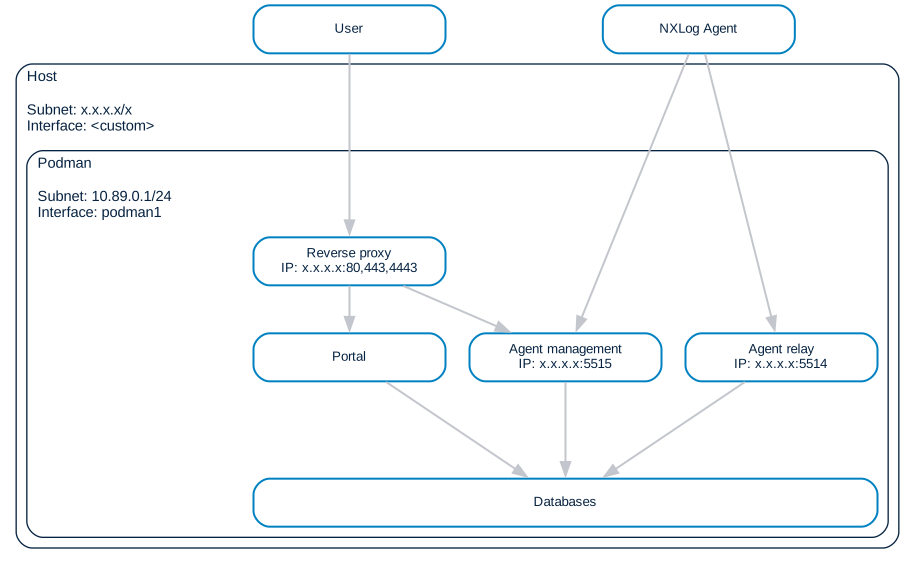
The host network routes incoming traffic to the NXLog Platform stack, such as:
-
Client requests to the NXLog Platform web interface.
-
NXLog Agent communication with Agent Management.
-
NXLog Agent forwarding logs to NXLog Platform.
The internal Podman network allows the NXLog Platform containers to communicate between them, receive requests through the reverse proxy, and communicate with external services.