
Syslog (xm_syslog)
This module parses or generates syslog messages in the following formats:
| To examine the supported platforms, see the list of installation packages. |
BSD syslog format
The legacy format is relatively simple and has a loosely defined structure, with the following components.
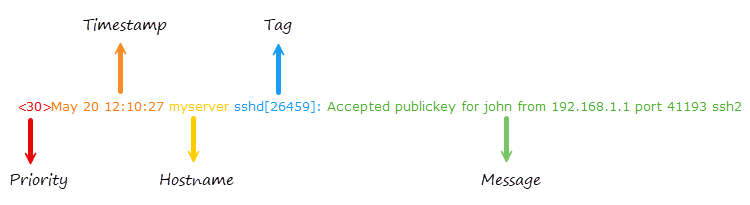
| Component | Description |
|---|---|
|
The priority value, which encodes both the facility and severity level.
For example, |
|
The date and time in the format |
|
The name or IP address of the machine that generated the message.
For example, |
|
Typically contains the name of the program or process generating the message and the process ID.
It is often followed by a colon.
For example, |
|
Free-form text containing the log message, spanning until the EOL.
For example, |
IETF syslog format
The IETF syslog format is a more modern, structured, and standardized format that supports additional metadata fields.
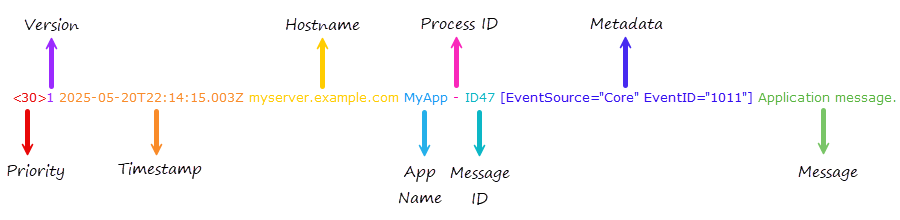
| Component | Description |
|---|---|
|
The priority value, which encodes both the facility and severity level.
For example, |
|
The syslog protocol version number.
It is always |
|
The timestamp in ISO 8601 format, which includes the year, time, milliseconds, and timezone.
For example, |
|
The Fully Qualified Domain Name (FQDN), IP address, or |
|
The name of the application that generated the message, similar to the tag in the BSD format. |
|
The process ID or |
|
The ID of the message type or |
|
Optional key-value pairs enclosed in square brackets or |
|
Free-form text containing the log message. It may include UTF-8 characters. |
While the IETF syslog format (RFC 5424) doesn’t natively define JSON or XML as part of the message format, it’s common practice to include data in those formats in the message component.
<165>1 2026-03-20T15:45:12.345Z appserver.example.com MyApp 12345 ID123 - {"event":"login","user":"jdoe","status":"success","ip":"192.168.1.10"}TLS for IETF syslog format
xm_syslog provides the following input reader and output writer functions to handle the TLS for IETF syslog format (RFC 5425), which supports multiline messages prefixed by the payload size in ASCII:
- InputType Syslog_TLS
-
Input reader function that parses the payload size and reads the message according to this value. You must use this function to collect syslog messages that adhere to the format specified in RFC 5425.
- OutputType Syslog_TLS
-
Output writer function that prefixes the message with the payload size. You must use this function to output syslog messages that comply with RFC 5425.
While RFC 5425 explicitly specifies using the TLS network transport protocol, you can use these functions with plain TCP if security is not a requirement. You can also use these functions to write syslog messages in this format to a file.
Parsing IETF syslog messages
xm_syslog parses the metadata key-value pairs into NXLog Agent fields.
It prefixes field names with the SD-ID, followed by a dot (.), unless the SD-ID is NXLOG.
For example, consider the following IETF syslog message:
<30>1 2026-03-20T14:16:10.000000+02:00 host.example.com MyApp - ID47 [MYAPP@32473 EventSource="Core" EventID="1011"] Application message.When parse_syslog_ietf() parses this message, it adds two fields: $MYAPP.EventSource and $MYAPP.EventID.
If the SD-ID is NXLOG, the field name will not be prefixed with the SD-ID.
In that case, the field names will be $EventSource and $EventID.
The module treats all metadata fields as strings.
Specifying quote, escape, and delimiter characters
The SnareDelimiter and SnareReplacement directives support several character specification formats.
- Unquoted single character
-
Any printable character can be specified as an unquoted character, except for the backslash (
\):Delimiter ;
- Control characters
-
The following non-printable characters can be specified with escape sequences:
- \a
-
audible alert (bell)
- \b
-
backspace
- \t
-
horizontal tab
- \n
-
newline
- \v
-
vertical tab
- \f
-
formfeed
- \r
-
carriage return
For example, to use TAB delimiting:
Delimiter \t
- Characters in single quotes
-
The configuration parser strips whitespace, so to define a space as the delimiter enclose it within quotes:
Delimiter ' '
Printable characters can also be enclosed:
Delimiter ';'
The backslash can be specified when enclosed within quotes:
Delimiter '\'
- Characters in double quotes
-
Double quotes can be used as single quotes:
Delimiter " "
The backslash can be specified when enclosed within double quotes:
Delimiter "\"
- Hexadecimal ASCII codes
-
Prefix hexadecimal ASCII character codes with
0x. For example, space can be specified as:Delimiter 0x20
This is equivalent to:
Delimiter " "
Configuration
The xm_syslog module accepts the following directives in addition to the common module directives.
Optional directives
This directive is an alias for UTCTimestamp. |
|
Set this directive to replace line breaks with another character when generating syslog messages with to_syslog_bsd(), to_syslog_ietf(), and to_syslog_snare().
Set it to |
|
Set this directive to specify the character that separates fields when generating log records with to_syslog_snare().
The last field in the record is not followed by a delimiter.
The default is a tab ( |
|
Set this directive to specify the character that replaces occurrences of the delimiter in the |
|
Set this directive to |
Functions
The following functions are exported by xm_syslog.
- type: string
syslog_facility_string(type: integer arg) -
Converts a Syslog facility value to a string.
- type: integer
syslog_facility_value(type: string arg) -
Converts a syslog facility string to an integer.
- type: string
syslog_severity_string(type: integer arg) -
Converts a syslog severity value to a string.
- type: integer
syslog_severity_value(type: string arg) -
Converts a syslog severity string to an integer.
Procedures
The following procedures are exported by xm_syslog.
-
parse_syslog(); -
Parses the $raw_event field as either BSD syslog (RFC 3164) or IETF syslog (RFC 5424) format.
-
parse_syslog(type: string source); -
Parses the given string as either BSD syslog (RFC 3164) or IETF syslog (RFC 5424) format.
-
parse_syslog_bsd(); -
Parses the $raw_event field as BSD syslog (RFC 3164) format.
-
parse_syslog_bsd(type: string source); -
Parses the given string as BSD syslog (RFC 3164) format.
-
parse_syslog_ietf(); -
Parses the $raw_event field as IETF syslog (RFC 5424) format.
-
parse_syslog_ietf(type: string source); -
Parses the given string as IETF syslog (RFC 5424) format.
-
to_snare(); -
Converts the log record to Snare format and writes it to the $raw_event field. It uses the following fields to construct the message.
Field Type stringstringstringstringintegerdatetimestringstringstringstringintegerintegerstringIf a field is not present, a relevant default is used. See our Snare integration guide for configuration examples.
-
to_syslog_bsd(); -
Creates a BSD Syslog formatted log message in $raw_event from the fields of the event. The following fields are used to construct the $raw_event field: $EventTime; $Hostname; $SourceName; $ProcessID or $ExecutionProcessID; $Message or $raw_event; $SyslogSeverity, $SyslogSeverityValue, $Severity, or $SeverityValue; and $SyslogFacility or $SyslogFacilityValue. If the fields are not present, a sensible default is used.
-
to_syslog_ietf(); -
Converts the record to an IETF syslog (RFC 5424) message and populates the $raw_event field. It uses the following fields to construct the message: $EventTime; $Hostname; $SourceName; $ProcessID or $ExecutionProcessID; $Message or $raw_event; $SyslogSeverity, $SyslogSeverityValue, $Severity, or $SeverityValue; and $SyslogFacility or $SyslogFacilityValue. If the fields are not present, a sensible default is used.
-
to_syslog_snare(); -
Converts the log record to Snare syslog format and writes it to the $raw_event field. This procedure is compatible with the Snare format for Windows Event Log. It uses the following fields to construct the message.
Field Type stringstringstringstringintegerdatetimestringstringstringstringintegerintegerstringIf a field is not present, a relevant default is used. See our Snare integration guide for configuration examples.
Fields
The following fields are created by xm_syslog.
In addition to the fields listed below, the
parse_syslog() and
parse_syslog_ietf()
procedures will create fields from the Structured Data part of an IETF
Syslog message. If the SD-ID in this case is not "NXLOG", these fields
will be prefixed by the SD-ID (for example, $mySDID.CustomField).
-
$raw_event(type: string) -
A Syslog formatted string, set after to_syslog_bsd(), to_syslog_ietf(), or to_snare(), or to_syslog_snare() is invoked.
-
$EventTime(type: datetime) -
The timestamp found in the Syslog message, set after parse_syslog(), parse_syslog_bsd(), or parse_syslog_ietf() is called. If the year value is missing, it is set as described in the core fix_year() function.
-
$Hostname(type: string) -
The hostname part of the Syslog line, set after parse_syslog(), parse_syslog_bsd(), or parse_syslog_ietf() is called.
-
$Message(type: string) -
The message part of the Syslog line, set after parse_syslog(), parse_syslog_bsd(), or parse_syslog_ietf() is called.
-
$MessageID(type: string) -
The MSGID part of the syslog message, set after parse_syslog_ietf() is called.
-
$ProcessID(type: string) -
The process ID in the Syslog line, set after parse_syslog(), parse_syslog_bsd(), or parse_syslog_ietf() is called.
-
$Severity(type: string) -
The normalized severity name of the event. See $SeverityValue.
-
$SeverityValue(type: integer) -
The normalized severity number of the event, mapped as follows.
Syslog Severity Normalized Severity 0/emerg
5/critical
1/alert
5/critical
2/crit
5/critical
3/err
4/error
4/warning
3/warning
5/notice
2/info
6/info
2/info
7/debug
1/debug
-
$SourceName(type: string) -
The application/program part of the Syslog line, set after parse_syslog(), parse_syslog_bsd(), or parse_syslog_ietf() is called.
-
$SyslogFacility(type: string) -
The facility name of the Syslog line, set after parse_syslog(), parse_syslog_bsd(), or parse_syslog_ietf() is called. The default facility is
user. -
$SyslogFacilityValue(type: integer) -
The facility code of the Syslog line, set after parse_syslog(), parse_syslog_bsd(), or parse_syslog_ietf() is called. The default facility is
1(user). -
$SyslogSeverity(type: string) -
The severity name of the Syslog line, set after parse_syslog(), parse_syslog_bsd(), or parse_syslog_ietf() is called. The default severity is
notice. See $SeverityValue. -
$SyslogSeverityValue(type: integer) -
The severity code of the Syslog line, set after parse_syslog(), parse_syslog_bsd(), or parse_syslog_ietf() is called. The default severity is
5(notice). See $SeverityValue.
Examples
|
Parsing syslog messages
When collecting logs from multiple sources, you may need to process syslog messages in both the BSD and IETF formats. In such cases, use the generic parse_syslog() procedure to automatically detect the syslog message format.
If you receive syslog messages in one format, use the dedicated procedures parse_syslog_bsd() or parse_syslog_ietf() to reduce processing overhead.
<Extension syslog>
    Module        xm_syslog
</Extension>

<Input udp_listen>
    Module        im_udp
    ListenAddr    0.0.0.0:514
    Exec          parse_syslog();
</Input>
This input sample consists of two lines, an IETF syslog message on the first line and a BSD syslog message on the second.
<30>1 2026-03-10T09:40:27.000Z myserver sshd 26459 - [origin ip="192.168.1.1" software="sshd" swVersion="1.0"][auth method="publickey" user="john" srcPort="41193" protocol="ssh2"] Accepted publickey for john from 192.168.1.1 port 41193 ssh2
<30>Mar 10 09:40:27 myserver sshd[26459]: Accepted publickey for john from 192.168.1.1 port 41193 ssh2
When this configuration processes the first message, which is in IETF format, it adds the following fields to the log record:
| Field | Value |
|---|---|
$EventReceivedTime |
2026-03-10 09:59:37 |
$SourceModuleName |
udp_listen |
$SourceModuleType |
im_udp |
$Hostname |
myserver |
$SyslogFacilityValue |
3 |
$SyslogFacility |
DAEMON |
$SyslogSeverityValue |
6 |
$SyslogSeverity |
INFO |
$SeverityValue |
2 |
$Severity |
INFO |
$EventTime |
2026-03-10 09:40:27 |
$SourceName |
sshd |
$ProcessID |
26459 |
$origin.ip |
192.168.1.1 |
$origin.software |
sshd |
$origin.swVersion |
1.0 |
$auth.method |
publickey |
$auth.user |
john |
$auth.srcPort |
41193 |
$auth.protocol |
ssh2 |
$Message |
Accepted publickey for john from 192.168.1.1 port 41193 ssh2 |
$raw_event |
<30>1 2026-03-10T09:40:27.000Z myserver sshd 26459 - [origin ip="192.168.1.1" software="sshd" swVersion="1.0"][auth method="publickey" user="john" srcPort="41193" protocol="ssh2"] Accepted publickey for john from 192.168.1.1 port 41193 ssh2 |
Processing the second message, which is in BSD format, results in the following fields:
| Field | Value |
|---|---|
$EventReceivedTime |
2026-03-10 09:59:37 |
$SourceModuleName |
udp_listen |
$SourceModuleType |
im_udp |
$Hostname |
myserver |
$SyslogFacilityValue |
3 |
$SyslogFacility |
DAEMON |
$SyslogSeverityValue |
6 |
$SyslogSeverity |
INFO |
$SeverityValue |
2 |
$Severity |
INFO |
$EventTime |
2026-03-10 09:40:27 |
$SourceName |
sshd |
$ProcessID |
26459 |
$Message |
Accepted publickey for john from 192.168.1.1 port 41193 ssh2 |
$raw_event |
<30>Mar 10 09:40:27 myserver sshd[26459]: Accepted publickey for john from 192.168.1.1 port 41193 ssh2 |
Parsing syslog messages results in several fields related to the event severity, such as $SyslogSeverityValue, $SyslogSeverity, $SeverityValue, and $Severity.
Depending on your SIEM or log analysis tool, you often only need one numeric or string severity field.
In this case, you can remove redundancy by deleting unnecessary fields.
|
This configuration receives logs over UDP and parses log records with the parse_syslog_ietf() procedure.
It then parses the $Message field with the parse_json() procedure and deletes it.
<Extension syslog>
    Module        xm_syslog
</Extension>

<Extension json>
    Module        xm_json
</Extension>

<Input udp_listen>
    Module        im_udp
    ListenAddr    0.0.0.0:514
    <Exec>
        parse_syslog_ietf();
        parse_json($Message);
        delete($Message);
    </Exec>
</Input>
The following is an IETF syslog message with JSON data.
<13>1 2026-03-10T11:23:11.000000+02:00 SRV01 - - - [NXLOG@14506 Purpose="test"] {"EventID": 1234, "Source": "MyApp", "Error": "Failed to load MyApp.exe"}When the NXLog Agent configuration above processes this message, it adds the following fields to the log record.
| Field | Value |
|---|---|
$EventReceivedTime |
2026-03-10T11:30:19.287827+02:00 |
$SourceModuleName |
udp_listen |
$SourceModuleType |
im_udp |
$Hostname |
SRV01 |
$SyslogFacilityValue |
1 |
$SyslogFacility |
USER |
$SyslogSeverityValue |
5 |
$SyslogSeverity |
NOTICE |
$SeverityValue |
2 |
$Severity |
INFO |
$EventTime |
2026-03-10 11:23:11 |
$Purpose |
test |
$EventID |
1234 |
$Source |
MyApp |
$Error |
Failed to load MyApp.exe |
$raw_event |
<13>1 2026-03-10T11:23:11.000000+02:00 SRV01 - - - [NXLOG@14506 Purpose="test"] {"EventID": 1234, "Source": "MyApp", "Error": "Failed to load MyApp.exe"} |
Forwarding syslog messages
This configuration collects nginx access logs from a file, uses the to_syslog_bsd() procedure to convert the log records to syslog, and then forwards them over UDP.
<Extension syslog>
    Module    xm_syslog
</Extension>

<Input nginx>
    Module    im_file
    File      '/var/log/nginx/access.log'
</Input>

<Output udp>
    Module    om_udp
    Host      192.168.1.123:514
    Exec      to_syslog_bsd();
</Output>
The following is an HTTP access log record generated by nginx.
192.168.1.5 - johndoe [10/Mar/2026:08:23:34 +0000] "GET /index.html HTTP/1.1" 200 612 "http://referrer.com/page" "Mozilla/5.0 (Windows NT 10.0; Win64; x64) AppleWebKit/537.36 (KHTML, like Gecko) Chrome/58.0.3029.110 Safari/537.36"In this case, NXLog Agent uses the following core fields to convert the record to BSD syslog format.
| Field | Value |
|---|---|
$EventReceivedTime |
Mar 10 11:07:24 |
$Hostname |
WEB-SVR |
$raw_event |
192.168.1.5 - johndoe [10/Mar/2026:08:23:34 +0000] "GET /index.html HTTP/1.1" 200 612 "http://referrer.com/page" "Mozilla/5.0 (Windows NT 10.0; Win64; x64) AppleWebKit/537.36 (KHTML, like Gecko) Chrome/58.0.3029.110 Safari/537.36" |
<13>Mar 10 11:07:24 WEB-SVR 192.168.1.5 - johndoe [10/Mar/2026:08:23:34 +0000] "GET /index.html HTTP/1.1" 200 612 "http://referrer.com/page" "Mozilla/5.0 (Windows NT 10.0; Win64; x64) AppleWebKit/537.36 (KHTML, like Gecko) Chrome/58.0.3029.110 Safari/537.36"This configuration collects Windows security events with the im_msvistalog input module, automatically parsing events into structured data. The output instance converts the log records to syslog with the to_syslog_bsd() procedure and writes them to a file.
<Extension syslog>
    Module    xm_syslog
</Extension>

<Input eventlog>
    Module    im_msvistalog
    <QueryXML>
       <QueryList>
          <Query Id="0" Path="Security">
             <Select Path="Security">*</Select>
          </Query>
       </QueryList>
    </QueryXML>
</Input>

<Output file>
    Module    om_file
    File      'C:\logs\eventlog.txt'
    Exec      to_syslog_bsd();
</Output>
The following input sample shows Windows event ID 4625 concerning a failed login attempt.
<Event xmlns="http://schemas.microsoft.com/win/2004/08/events/event">
  <System>
    <Provider Name="Microsoft-Windows-Security-Auditing" Guid="{54849625-5478-4994-a5ba-3e3b0328c30d}" />
    <EventID>4625</EventID>
    <Version>0</Version>
    <Level>0</Level>
    <Task>12544</Task>
    <Opcode>0</Opcode>
    <Keywords>0x8010000000000000</Keywords>
    <TimeCreated SystemTime="2026-03-10T20:34:38.1328923Z" />
    <EventRecordID>456703</EventRecordID>
    <Correlation ActivityID="{a9b5a229-9b0a-0008-7aa2-b5a90a9bda01}" />
    <Execution ProcessID="1124" ThreadID="7052" />
    <Channel>Security</Channel>
    <Computer>WIN-SERVER</Computer>
    <Security />
  </System>
  <EventData>
    <Data Name="SubjectUserSid">S-1-5-21-3603782361-128455402-3223720292-1002</Data>
    <Data Name="SubjectUserName">jdoe</Data>
    <Data Name="SubjectDomainName">NXLOG</Data>
    <Data Name="SubjectLogonId">0x9d84141</Data>
    <Data Name="TargetUserSid">S-1-0-0</Data>
    <Data Name="TargetUserName">jdoe</Data>
    <Data Name="TargetDomainName">NXLOG</Data>
    <Data Name="Status">0xc000006e</Data>
    <Data Name="FailureReason">%%2313</Data>
    <Data Name="SubStatus">0xc000006e</Data>
    <Data Name="LogonType">2</Data>
    <Data Name="LogonProcessName">Advapi</Data>
    <Data Name="AuthenticationPackageName">Negotiate</Data>
    <Data Name="WorkstationName">WIN-SERVER</Data>
    <Data Name="TransmittedServices">-</Data>
    <Data Name="LmPackageName">-</Data>
    <Data Name="KeyLength">0</Data>
    <Data Name="ProcessId">0x3990</Data>
    <Data Name="ProcessName">C:\Program Files\Google\Chrome\Application\chrome.exe</Data>
    <Data Name="IpAddress">-</Data>
    <Data Name="IpPort">-</Data>
  </EventData>
</Event>
In this case, NXLog Agent uses the following fields to convert the record to BSD syslog format.
| Field | Value |
|---|---|
$EventTime |
2026-03-10 20:34:38 |
$Hostname |
WIN-SERVER |
$SourceName |
Microsoft-Windows-Security-Auditing |
$ProcessID |
0x3990 |
$raw_event |
An account failed to log on. … |
<11>Mar 10 22:34:38 WIN-SERVER Microsoft-Windows-Security-Auditing[0x3990]: An account failed to log on. Subject: Security ID: S-1-5-21-3603782361-128455402-3223720292-1002 Account Name: jdoe Account Domain: NXLOG Logon ID: 0x9d84141 Logon Type: 2 Account For Which Logon Failed: Security ID: S-1-0-0 Account Name: jdoe Account Domain: NXLOG Failure Information: Failure Reason: Unknown user name or bad password. Status: 0xc000006e Sub Status: 0xc000006e Process Information: Caller Process ID: 0x3990 Caller Process Name: C:\Program Files\Google\Chrome\Application\chrome.exe Network Information: Workstation Name: WIN-SERVER Source Network Address: - Source Port: - Detailed Authentication Information: Logon Process: Advapi Authentication Package: Negotiate Transited Services: - Package Name (NTLM only): - Key Length: 0 This event is generated when a logon request fails. It is generated on the computer where access was attempted. The Subject fields indicate the account on the local system which requested the logon. This is most commonly a service such as the Server service, or a local process such as Winlogon.exe or Services.exe. The Logon Type field indicates the kind of logon that was requested. The most common types are 2 (interactive) and 3 (network). The Process Information fields indicate which account and process on the system requested the logon. The Network Information fields indicate where a remote logon request originated. Workstation name is not always available and may be left blank in some cases. The authentication information fields provide detailed information about this specific logon request. - Transited services indicate which intermediate services have participated in this logon request. - Package name indicates which sub-protocol was used among the NTLM protocols. - Key length indicates the length of the generated session key. This will be 0 if no session key was requested.This configuration collects plain-text logs from a file, uses the to_syslog_ietf() procedure to convert them to syslog, and then forwards the records over UDP.
<Extension syslog>
    Module    xm_syslog
</Extension>

<Input fin_logs>
    Module    im_file
    File      '/var/log/transactions.log'
</Input>

<Output udp>
    Module    om_udp
    Host      192.168.1.123:514
    Exec      to_syslog_ietf();
</Output>
The following is a log record of a financial transaction.
2026-03-10 08:53:22, INFO, UserID:12345, Action: Transaction Attempt, Amount: $250.00, DeviceID: AB1234C, DeviceType: Mobile, Location: New York, IP: 192.168.1.1, Result: Success, Additional Info: Transaction completed without issues.In this case, NXLog Agent uses the following core fields to convert the record to IETF syslog format.
| Field | Value |
|---|---|
$EventReceivedTime |
2026-03-10 08:54:46 |
$Hostname |
FIN-SERVER |
$raw_event |
2026-03-10 08:53:22, INFO, UserID:12345, Action: Transaction Attempt, Amount: $250.00, DeviceID: AB1234C, DeviceType: Mobile, Location: New York, IP: 192.168.1.1, Result: Success, Additional Info: Transaction completed without issues. |
<13>1 2026-03-10T08:54:46.337598+02:00 FIN-SERVER - - - [NXLOG@14506 EventReceivedTime="2026-03-10 08:54:46" SourceModuleName="fin_logs" SourceModuleType="im_file"] 2026-03-10 08:53:22, INFO, UserID:12345, Action: Transaction Attempt, Amount: $250.00, DeviceID: AB1234C, DeviceType: Mobile, Location: New York, IP: 192.168.1.1, Result: Success, Additional Info: Transaction completed without issues.This configuration collects Linux Audit logs with the im_linuxaudit input module, automatically parsing events into structured data. The output instance converts the log records to syslog with the to_syslog_ietf() procedure and writes them to a file.
<Extension syslog>
    Module           xm_syslog
</Extension>

<Extension resolver>
    Module           xm_resolver
</Extension>

<Input linuxaudit>
    Module           im_linuxaudit
    FlowControl      FALSE
    ResolveValues    TRUE
    <Rules>
        -w /home/johndoe/privatekey -p wa -k privatekey_change
    </Rules>
</Input>

<Output file>
    Module           om_file
    File             '/var/log/messages'
    Exec             to_syslog_ietf();
</Output>
The following input sample shows a Linux audit event related to a file change.
2026-03-10 13:41:13 NXLOG-LINUX INFO type="SYSCALL" time="2026-03-10 13:41:13" seq="336" arch="x86_64" syscall="openat" success="yes" exit="91" a0="ffffff9c" a1="55dfae2c3a98" a2="80241" a3="1b6" items="2" ppid="1412" pid="29957" auid="4294967295" uid="1000" gid="1000" euid="1000" suid="1000" fsuid="1000" egid="1000" sgid="1000" fsgid="1000" tty="(none)" ses="4294967295" comm="notepadqq-bin" exe="/usr/lib/notepadqq/notepadqq-bin" key="privatekeychange"In this case, NXLog Agent uses the following fields to convert the record to syslog IETF format.
| Field | Value |
|---|---|
$type |
SYSCALL |
$time |
2026-03-10 13:41:13 |
$seq |
295 |
$arch |
x86_64 |
$syscall |
openat |
$success |
yes |
$exit |
97 |
$a0 |
ffffff9c |
$a1 |
55dfae2c3a98 |
$a2 |
80241 |
$a3 |
1b6 |
$items |
2 |
$ppid |
1412 |
$pid |
29957 |
$auid |
4294967295 |
$uid |
1000 |
$gid |
1000 |
$euid |
1000 |
$suid |
1000 |
$fsuid |
1000 |
$egid |
1000 |
$sgid |
1000 |
$fsgid |
1000 |
$tty |
(none) |
$ses |
4294967295 |
$comm |
notepadqq-bin |
$exe |
/usr/lib/notepadqq/notepadqq-bin |
$key |
privatekeychange |
$Hostname |
NXLOG-LINUX |
$EventReceivedTime |
2026-03-10 13:42:45 |
$SourceModuleName |
linuxaudit |
$SourceModuleType |
im_linuxaudit |
$raw_event |
2026-03-10 13:41:13 NXLOG-LINUX INFO type="SYSCALL" time="2026-03-10 13:41:13" seq="336" arch="x86_64" syscall="openat" success="yes" exit="91" a0="ffffff9c" a1="55dfae2c3a98" a2="80241" a3="1b6" items="2" ppid="1412" pid="29957" auid="4294967295" uid="1000" gid="1000" euid="1000" suid="1000" fsuid="1000" egid="1000" sgid="1000" fsgid="1000" tty="(none)" ses="4294967295" comm="notepadqq-bin" exe="/usr/lib/notepadqq/notepadqq-bin" key="privatekeychange" |
<13>1 2026-03-10T13:41:13.615621+02:00 NXLOG-LINUX - - - [NXLOG@14506 type="SYSCALL" time="2026-03-10 12:46:54" seq="283" arch="x86_64" syscall="openat" success="yes" exit="91" a0="ffffff9c" a1="55dfad8e4e28" a2="80241" a3="1b6" items="2" ppid="1412" pid="29957" auid="4294967295" uid="1000" gid="1000" euid="1000" suid="1000" fsuid="1000" egid="1000" sgid="1000" fsgid="1000" tty="(none)" ses="4294967295" comm="notepadqq-bin" exe="/usr/lib/notepadqq/notepadqq-bin" key="privatekeychange" EventReceivedTime="2026-03-10 13:41:13" SourceModuleName="linuxaudit" SourceModuleType="im_linuxaudit"] 2026-03-10 13:41:13 NXLOG-LINUX INFO type="SYSCALL" time="2026-03-10 13:41:13" seq="283" arch="x86_64" syscall="openat" success="yes" exit="91" a0="ffffff9c" a1="55dfad8e4e28" a2="80241" a3="1b6" items="2" ppid="1412" pid="29957" auid="4294967295" uid="1000" gid="1000" euid="1000" suid="1000" fsuid="1000" egid="1000" sgid="1000" fsgid="1000" tty="(none)" ses="4294967295" comm="notepadqq-bin" exe="/usr/lib/notepadqq/notepadqq-bin" key="privatekeychange"This configuration collects Windows security events with the im_msvistalog input module, automatically parsing events into structured data. The output instance converts the Windows events to JSON, removes unnecessary fields, and converts log records to IETF syslog.
<Extension syslog>
    Module    xm_syslog
</Extension>

<Extension json>
    Module    xm_json
</Extension>

<Extension rewrite>
    Module    xm_rewrite
    Keep      EventTime, Hostname, SourceName, ExecutionProcessID, SourceModuleName, SourceModuleType, Message
</Extension>

<Input eventlog>
    Module    im_msvistalog
    <QueryXML>
       <QueryList>
          <Query Id="0" Path="Security">
             <Select Path="Security">*</Select>
          </Query>
       </QueryList>
    </QueryXML>
</Input>

<Output udp>
    Module    om_udp
    Host      192.168.1.123:514
    <Exec>
        $Message = to_json(); (1)
        rewrite->process();   (2)
        to_syslog_ietf();     (3)
    </Exec>
</Output>| 1 | Uses the to_json() procedure to convert the record to JSON and sets the $Message field to the returned value. |
| 2 | Uses the xm_rewrite module to remove unnecessary fields after converting the record to JSON. |
| 3 | Uses the to_syslog_ietf() to convert the record to IETF syslog. |
The following input sample shows Windows event ID 4624 concerning a successful logon.
<Event xmlns="http://schemas.microsoft.com/win/2004/08/events/event">
  <System>
    <Provider Name="Microsoft-Windows-Security-Auditing" Guid="{54849625-5478-4994-a5ba-3e3b0328c30d}" />
    <EventID>4624</EventID>
    <Version>3</Version>
    <Level>0</Level>
    <Task>12544</Task>
    <Opcode>0</Opcode>
    <Keywords>0x8020000000000000</Keywords>
    <TimeCreated SystemTime="2026-03-10T13:37:09.4398779Z" />
    <EventRecordID>750557</EventRecordID>
    <Correlation ActivityID="{a3d29cba-f6a9-0004-ce9c-d2a3a9f6db01}" />
    <Execution ProcessID="1268" ThreadID="28476" />
    <Channel>Security</Channel>
    <Computer>SRV01</Computer>
    <Security />
  </System>
  <EventData>
    <Data Name="SubjectUserSid">S-1-5-18</Data>
    <Data Name="SubjectUserName">SRV01$</Data>
    <Data Name="SubjectDomainName">WORKGROUP</Data>
    <Data Name="SubjectLogonId">0x3e7</Data>
    <Data Name="TargetUserSid">S-1-5-18</Data>
    <Data Name="TargetUserName">SYSTEM</Data>
    <Data Name="TargetDomainName">NT AUTHORITY</Data>
    <Data Name="TargetLogonId">0x3e7</Data>
    <Data Name="LogonType">5</Data>
    <Data Name="LogonProcessName">Advapi</Data>
    <Data Name="AuthenticationPackageName">Negotiate</Data>
    <Data Name="WorkstationName">-</Data>
    <Data Name="LogonGuid">{00000000-0000-0000-0000-000000000000}</Data>
    <Data Name="TransmittedServices">-</Data>
    <Data Name="LmPackageName">-</Data>
    <Data Name="KeyLength">0</Data>
    <Data Name="ProcessId">0x4e0</Data>
    <Data Name="ProcessName">C:\Windows\System32\services.exe</Data>
    <Data Name="IpAddress">-</Data>
    <Data Name="IpPort">-</Data>
    <Data Name="ImpersonationLevel">%%1833</Data>
    <Data Name="RestrictedAdminMode">-</Data>
    <Data Name="RemoteCredentialGuard">-</Data>
    <Data Name="TargetOutboundUserName">-</Data>
    <Data Name="TargetOutboundDomainName">-</Data>
    <Data Name="VirtualAccount">%%1843</Data>
    <Data Name="TargetLinkedLogonId">0x0</Data>
    <Data Name="ElevatedToken">%%1842</Data>
  </EventData>
</Event>
In this case, NXLog Agent uses the following fields to convert the record to IETF syslog format.
| Field | Value |
|---|---|
$EventTime |
2026-03-10 15:37:09 |
$Hostname |
SRV01 |
$SourceName |
Microsoft-Windows-Security-Auditing |
$ExecutionProcessID |
1268 |
$SourceModuleName |
eventlog |
$SourceModuleType |
im_msvistalog |
$Message |
{"EventTime":"2026-03-10T15:37:09.439877+02:00","Hostname":"SRV01","Keywords":"0x8020000000000000"…} |
<13>1 2026-03-10T15:37:13.102311+02:00 SRV01 Microsoft-Windows-Security-Auditing 1268 - [NXLOG@14506 SourceModuleName="eventlog" SourceModuleType="im_msvistalog"] {"EventTime":"2026-03-10T15:37:09.439877+02:00","Hostname":"SRV01","Keywords":"0x8020000000000000","LevelValue":0,"EventType":"AUDIT_SUCCESS","SeverityValue":2,"Severity":"INFO","EventID":4624,"SourceName":"Microsoft-Windows-Security-Auditing","ProviderGuid":"{54849625-5478-4994-A5BA-3E3B0328C30D}","Version":3,"TaskValue":12544,"OpcodeValue":0,"RecordNumber":750557,"ActivityID":"{A3D29CBA-F6A9-0004-CE9C-D2A3A9F6DB01}","ExecutionProcessID":1268,"ExecutionThreadID":28476,"Channel":"Security","Message":"An account was successfully logged on.\r\n\r\nSubject:\r\n\tSecurity ID:\t\tS-1-5-18\r\n\tAccount Name:\t\tSRV01$\r\n\tAccount Domain:\t\tWORKGROUP\r\n\tLogon ID:\t\t0x3e7\r\n\r\nLogon Information:\r\n\tLogon Type:\t\t5\r\n\tRestricted Admin Mode:\t-\r\n\tRemote Credential Guard:\t-\r\n\tVirtual Account:\t\t%%1843\r\n\tElevated Token:\t\t%%1842\r\n\r\nImpersonation Level:\t\t%%1833\r\n\r\nNew Logon:\r\n\tSecurity ID:\t\tS-1-5-18\r\n\tAccount Name:\t\tSYSTEM\r\n\tAccount Domain:\t\tNT AUTHORITY\r\n\tLogon ID:\t\t0x3e7\r\n\tLinked Logon ID:\t\t0x0\r\n\tNetwork Account Name:\t-\r\n\tNetwork Account Domain:\t-\r\n\tLogon GUID:\t\t{00000000-0000-0000-0000-000000000000}\r\n\r\nProcess Information:\r\n\tProcess ID:\t\t0x4e0\r\n\tProcess Name:\t\tC:\\Windows\\System32\\services.exe\r\n\r\nNetwork Information:\r\n\tWorkstation Name:\t-\r\n\tSource Network Address:\t-\r\n\tSource Port:\t\t-\r\n\r\nDetailed Authentication Information:\r\n\tLogon Process:\t\tAdvapi \r\n\tAuthentication Package:\tNegotiate\r\n\tTransited Services:\t-\r\n\tPackage Name (NTLM only):\t-\r\n\tKey Length:\t\t0\r\n\r\nThis event is generated when a logon session is created. It is generated on the computer that was accessed.\r\n\r\nThe subject fields indicate the account on the local system which requested the logon. This is most commonly a service such as the Server service, or a local process such as Winlogon.exe or Services.exe.\r\n\r\nThe logon type field indicates the kind of logon that occurred. The most common types are 2 (interactive) and 3 (network).\r\n\r\nThe New Logon fields indicate the account for whom the new logon was created, i.e. the account that was logged on.\r\n\r\nThe network fields indicate where a remote logon request originated. Workstation name is not always available and may be left blank in some cases.\r\n\r\nThe impersonation level field indicates the extent to which a process in the logon session can impersonate.\r\n\r\nThe authentication information fields provide detailed information about this specific logon request.\r\n\t- Logon GUID is a unique identifier that can be used to correlate this event with a KDC event.\r\n\t- Transited services indicate which intermediate services have participated in this logon request.\r\n\t- Package name indicates which sub-protocol was used among the NTLM protocols.\r\n\t- Key length indicates the length of the generated session key. This will be 0 if no session key was requested.","Category":"User Account Management","Opcode":"Info","Level":"Information","SubjectUserSid":"S-1-5-18","SubjectUserName":"SRV01$","SubjectDomainName":"WORKGROUP","SubjectLogonId":"0x3e7","TargetUserSid":"S-1-5-18","TargetUserName":"SYSTEM","TargetDomainName":"NT AUTHORITY","TargetLogonId":"0x3e7","LogonType":5,"LogonProcessName":"Advapi ","AuthenticationPackageName":"Negotiate","WorkstationName":"-","LogonGuid":"{00000000-0000-0000-0000-000000000000}","TransmittedServices":"-","LmPackageName":"-","KeyLength":0,"ProcessId":"0x4e0","ProcessName":"C:\\Windows\\System32\\services.exe","IpAddress":"-","IpPort":"-","ImpersonationLevel":"%%1833","ImpersonationLevelResolved":"Impersonation","RestrictedAdminMode":"-","RemoteCredentialGuard":"-","TargetOutboundUserName":"-","TargetOutboundDomainName":"-","VirtualAccount":"%%1843","VirtualAccountResolved":"No","TargetLinkedLogonId":"0x0","ElevatedToken":"%%1842","ElevatedTokenResolved":"Yes","EventReceivedTime":"2026-03-10T16:09:13.098387+02:00","SourceModuleName":"eventlog","SourceModuleType":"im_msvistalog"}